Pourquoi ce setup plutôt qu'un autre ?Why this setup rather than another?
Un seul mécanisme d'accès, aucune surface publique, et tout est scripté et vérifiable. One access mechanism, no public surface, and everything is scripted and verifiable.
Pas d'exposition publiqueNo public exposure
Aucun port HTTP/HTTPS ouvert sur l'internet. L'accès passe exclusivement par un tunnel SSH, avec une authentification applicative en plus.No HTTP/HTTPS port open to the internet. Access goes exclusively through an SSH tunnel, with app-level authentication on top.
LégerLightweight
Un VPS 1 vCPU / 2 Go de RAM suffit — opencode ne fait que des appels API sortants, il ne fait tourner aucun modèle en local (pas de GPU).A 1 vCPU / 2 GB RAM VPS is enough — opencode only makes outbound API calls; it runs no model locally (no GPU).
SimpleSimple
Un seul mécanisme d'accès (SSH), pas de daemon tiers, pas de compte externe à gérer.A single access mechanism (SSH), no third-party daemon, no external account to manage.
ReproductibleReproducible
Tout est scripté (un Makefile + un script de vérification), sans configuration manuelle non documentée.Everything is scripted (a Makefile + a verification script), with no undocumented manual configuration.
VérifiableVerifiable
Une suite de tests (make test) contrôle l'état réel du serveur, y compris les points de sécurité les plus faciles à mal configurer.A test suite (make test) checks the server's actual state, including the security points easiest to misconfigure.
Architecture
Le VPS n'a aucun port applicatif ouvert sur l'internet — seul SSH (22 par défaut) l'est. Tout le trafic vers opencode transite par le tunnel, chiffré de bout en bout. The VPS has no application port open to the internet — only SSH (22 by default) is. All traffic to opencode goes through the tunnel, encrypted end to end.
ufw : seulonly :22 ouvertopenfail2ban : anti brute-force SSHSSH brute-force guardopencode web @
127.0.0.1PrérequisRequirements
- Un VPS Ubuntu 24.04 avec accès root/sudo et ta clé SSH déjà installée dessus.An Ubuntu 24.04 VPS with root/sudo access and your SSH key already installed on it.
- Un
sudosans mot de passe pour cet utilisateur SSH : tout passe par unssh <commande>non interactif, où une demande de mot de passe ne peut pas être satisfaite. Les images cloud Ubuntu le font par défaut pour l'utilisateurubuntu; un VPS installé à la main en a besoin.Passwordlesssudofor that SSH user: everything runs over a non-interactivessh <command>, where a password prompt cannot be answered. Ubuntu cloud images do this by default for theubuntuuser; a hand-installed VPS needs it. make,ssh,scpetopenssldisponibles en local (déjà présents sur macOS/Linux) —opensslgénère le mot de passe d'opencode sur ta machine.make,ssh,scpandopensslavailable locally (already present on macOS/Linux) —opensslgenerates the opencode password on your machine.
Testé chez Gandi, mais rien n'y est spécifique. N'importe quel hébergeur convient : Hetzner Cloud, DigitalOcean, Vultr, Scaleway, OVHcloud, Linode/Akamai… Seule l'étape gandi-firewall porte le nom de Gandi — elle ne fait que rappeler de fermer les ports publics dans le pare-feu cloud de ta console (tous les hébergeurs en proposent un).
Tested on Gandi, but nothing is host-specific. Any provider works: Hetzner Cloud, DigitalOcean, Vultr, Scaleway, OVHcloud, Linode/Akamai… Only the gandi-firewall step is named after Gandi — it merely reminds you to close public ports in your console's cloud firewall (every provider has one).
Installation
Le pipeline s'arrête à chaque étape qui demande une action de ta part et affiche exactement quoi faire. Compte 15–25 minutes. The pipeline pauses at every step that needs an action from you and shows exactly what to do. Budget 15–25 minutes.
git clone puis make all sur un VPS neuf.
The install in video, end to end: git clone then make all on a fresh VPS (commentary in French).
-
Cloner le dépôtClone the repository
Récupère le
Makefileet les scripts en local.Grab the
Makefileand scripts locally.bash $ git clone https://github.com/StevenMorlier/opencode_vps_install.git $ cd opencode_vps_install -
Tout dérouler avec
make allRun it all withmake allUne seule commande enchaîne durcissement, swap, mises à jour, installation d'opencode et vérifications, avec des pauses de validation.
A single command chains hardening, swap, updates, opencode install and checks, with confirmation pauses.
bash $ make allAu premier lancement,
make alldemande l'adresse du VPS, l'utilisateur SSH (défautubuntu), le port (défaut4096) et facultativement un owner GitHub, puis les enregistre dansconfig.local.mk— git-ignoré, et sans aucun mot de passe. Les commandes suivantes n'ont donc plus rien à retaper.make configpermet de les changer ; passerVPS_HOST=…en ligne de commande l'emporte toujours.On the first run,make allasks for the VPS address, the SSH user (defaultubuntu), the port (default4096) and optionally a GitHub owner, then stores them inconfig.local.mk— git-ignored, and never holding a password. Later commands therefore have nothing to retype.make configchanges them; passingVPS_HOST=…on the command line always wins.Les messages du
Makefileet demake testsont en anglais — une seule langue pour l'outil. Ce tutoriel reste bilingue.TheMakefileandmake testspeak English only — one language for the tooling. This tutorial stays bilingual.Compte 15 à 25 minutes. L'essentiel part dans l'étape
security-updates: une image cloud a souvent plusieurs mois, et les 150+ mises à jour de sécurité en attente s'installent une par une. Quelques minutes silencieuses puis beaucoup de sortieapt— c'est normal, voir la FAQ.Budget 15 to 25 minutes. Most of it goes into thesecurity-updatesstep: a cloud image is often months old, and the 150+ pending security updates install one at a time. A few silent minutes then a lot ofaptoutput — that is normal, see the FAQ.Chaque étape est aussi utilisable seule (
make harden, etc.). Voici ce quemake allenchaîne :Each step can also run on its own (make harden, etc.). Here is whatmake allchains:ÉtapeStep Ce qu'elle faitWhat it does check-hostVérifie que l'accès SSH au VPS fonctionne avant que quoi que ce soit d'autre ne s'exécute.Checks that SSH access to the VPS works before anything else runs. gandi-firewallRappel des réglages à faire dans la console de ton hébergeur (pare-feu cloud).Reminder of the settings to make in your provider's console (cloud firewall). hardenufw: deny incoming posé explicitement, le port SSH par lequel tu es connecté laissé ouvert, tout le reste bloqué + désactivation de l'auth SSH par mot de passe (clé uniquement).ufw: default-deny incoming set explicitly, the SSH port you are connected through left open, everything else blocked + SSH password auth disabled (key only).fail2banInstalle fail2ban+ une jailsshdqui bannit les IP qui brute-forcent SSH (Ubuntu ne l'installe pas par défaut).Installsfail2ban+ ansshdjail that bans IPs brute-forcing SSH (Ubuntu doesn't ship it by default).swapAjoute un fichier de swap de 2 Go (filet de sécurité sur un VPS à faible RAM) + un vm.swappiness=10persistant.Adds a 2 GB swap file (safety net on a low-RAM VPS) + a persistentvm.swappiness=10.security-updatesActive les mises à jour de sécurité auto + demande si le reboot auto doit être activé (programmé à 04:00), puis lance un premier passage (10–15 min sur une image fraîche).Enables automatic security updates + asks whether auto-reboot should be on (scheduled at 04:00), then runs a first upgrade pass (10–15 min on a fresh image). opencode-installInstalle opencode via le script officiel (mise à jour ensuite : make opencode-update).Installs opencode via the official script (updating later:make opencode-update).opencode-web-serviceDéploie opencode weben service systemd, lié à127.0.0.1uniquement, mot de passe généré, log applicatif branché sur journald et rotation du fichier de log d'opencode. Relançable sans risque : il conserve le mot de passe existant (ROTATE_PASSWORD=yespour en générer un nouveau) et redémarre toujours le service.Deploysopencode webas a systemd service, bound to127.0.0.1only, with a generated password, its application log wired into journald and rotation for opencode's log file. Safe to re-run: it keeps the existing password (ROTATE_PASSWORD=yesto mint a new one) and always restarts the service.testSuite de vérifications de bout en bout.End-to-end verification suite. Note le mot de passeWrite down the password
L'étape
opencode-web-servicegénère un mot de passe applicatif.make allle réaffiche dans son récapitulatif final, avec l'URL à ouvrir — l'identifiant à saisir dans le navigateur estopencode. Etmake passwordle réaffiche à tout moment.Theopencode-web-servicestep generates an app password.make allprints it again in its closing recap, along with the URL to open — the username to enter in the browser isopencode. Andmake passwordprints it back at any time. -
Se connecter via le tunnelConnect through the tunnel
Cette commande reste au premier plan (Ctrl+C pour fermer) et ouvre le tunnel SSH.
This command stays in the foreground (Ctrl+C to close) and opens the SSH tunnel.
bash $ make tunnelUne fois connecté, ouvre
http://127.0.0.1:4096dans ton navigateur.Once connected, open
http://127.0.0.1:4096in your browser.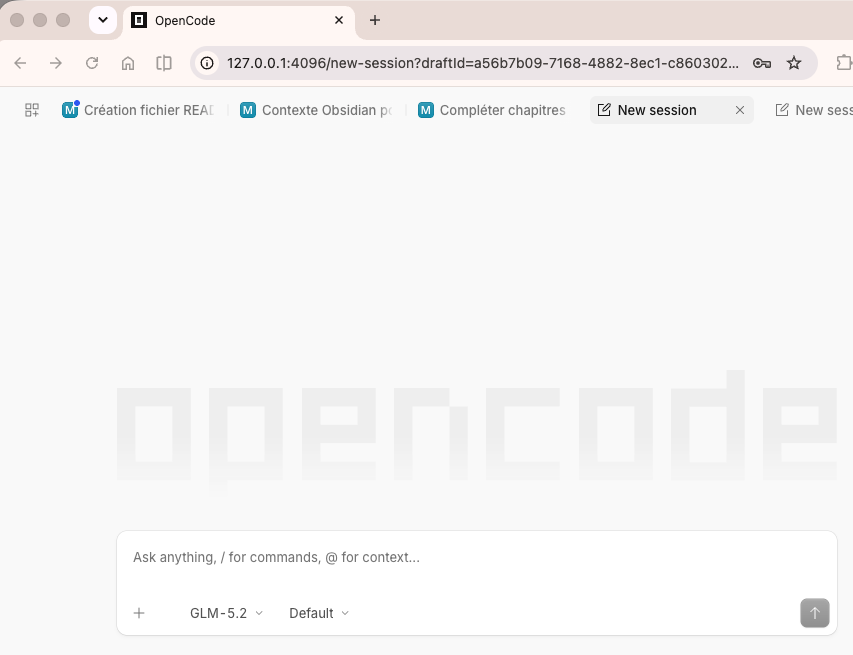
opencode web, accédé en local via le tunnel SSH.opencode web, reached locally through the SSH tunnel.
Usage quotidienDaily use
Au quotidien, une seule commande suffit. Ouvre le tunnel, garde le terminal ouvert pendant la session, puis rends-toi sur http://127.0.0.1:4096.Day to day, one command is enough. Open the tunnel, keep the terminal open during your session, then head to http://127.0.0.1:4096.
$ make tunnel
==> Opening the SSH tunnel: http://127.0.0.1:4096 once connected (Ctrl+C to close)
Mettre le Mac en veille coupe la connexion ; il suffit de relancer make tunnel. Ce n'est pas un accès « toujours connecté » en arrière-plan.Putting the Mac to sleep drops the connection; just re-run make tunnel. This is not an always-on background access.
Quand quelque chose cloche, make logs suit en direct ce qu'opencode écrit — le service tourne avec --print-logs, donc son log applicatif arrive dans journald et pas seulement dans un fichier isolé sur le VPS.When something misbehaves, make logs follows what opencode itself writes — the service runs with --print-logs, so its application log reaches journald instead of only a file tucked away on the VPS.
$ make logs
==> opencode application log from journald (since -30min, Ctrl+C to stop)
Le niveau par défaut est WARN, volontairement : en INFO, opencode journalise le texte de chaque commande shell lancée par un agent, identifiants compris. Pour un débogage, make opencode-web-service OC_LOG_LEVEL=INFO, puis remets-le.The default level is WARN, on purpose: at INFO, opencode logs the text of every shell command an agent runs, credentials included. For a debugging session, make opencode-web-service OC_LOG_LEVEL=INFO, then put it back.
De temps en temps, passe l'installation à la dernière version d'opencode. Rien ne le fait tout seul sur le VPS : les mises à jour automatiques couvrent les paquets Ubuntu, et opencode n'en est pas un.Every now and then, move the install to the latest opencode. Nothing on the VPS does it on its own: the automatic updates cover Ubuntu packages, and opencode isn't one.
$ make opencode-update
    installed: 1.18.4
    1.18.4 -> 1.18.11
==> Restarting opencode-web so the running process is the new binary
La cible met à jour le binaire et redémarre le service — sans ce redémarrage, systemd continuerait de servir l'ancienne version. Si tu es déjà à jour, elle ne redémarre rien : vérifier ne coupe jamais une session en cours.The target updates the binary and restarts the service — without that restart, systemd would keep serving the old version. If you're already up to date it restarts nothing: checking never cuts a session mid-run.
Accès depuis iPhone (Termius)Access from iPhone (Termius)
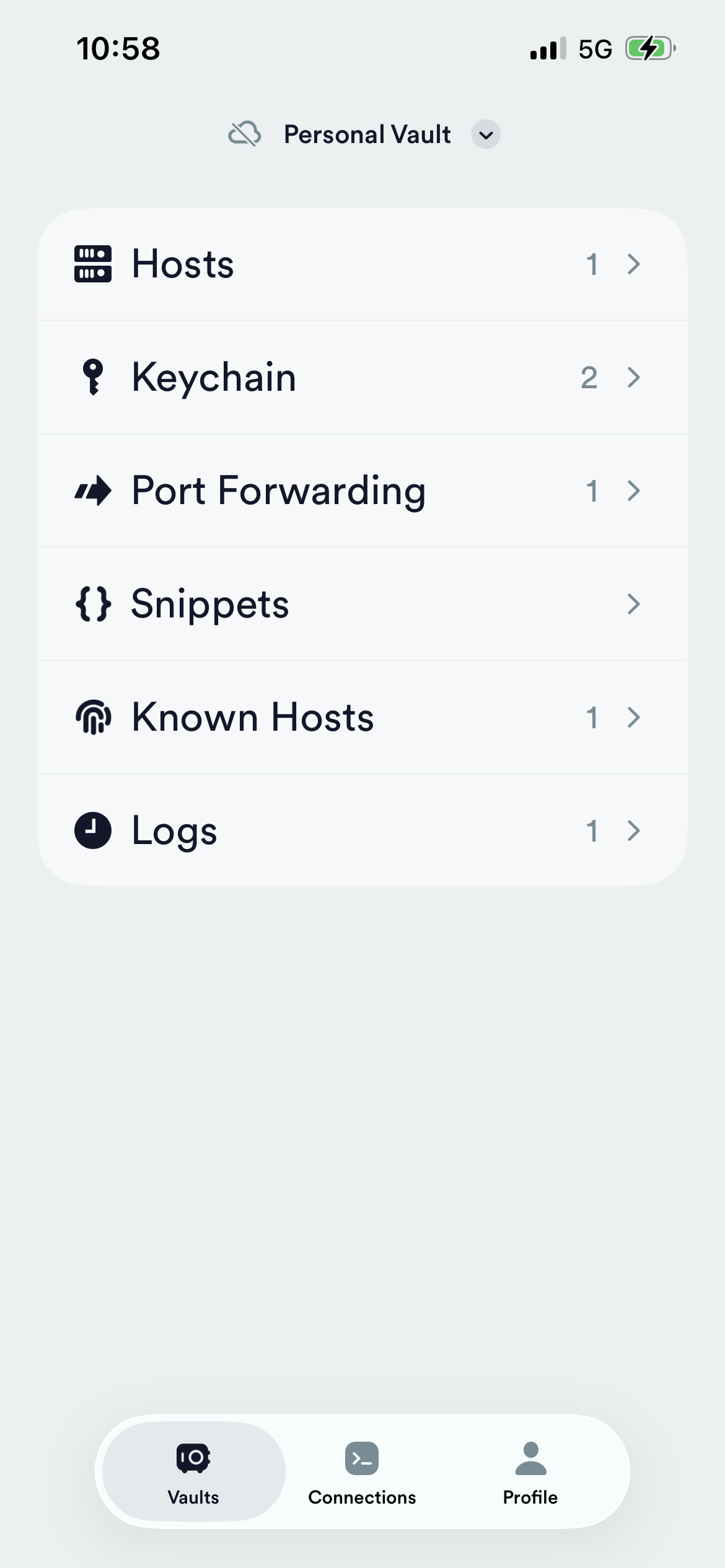
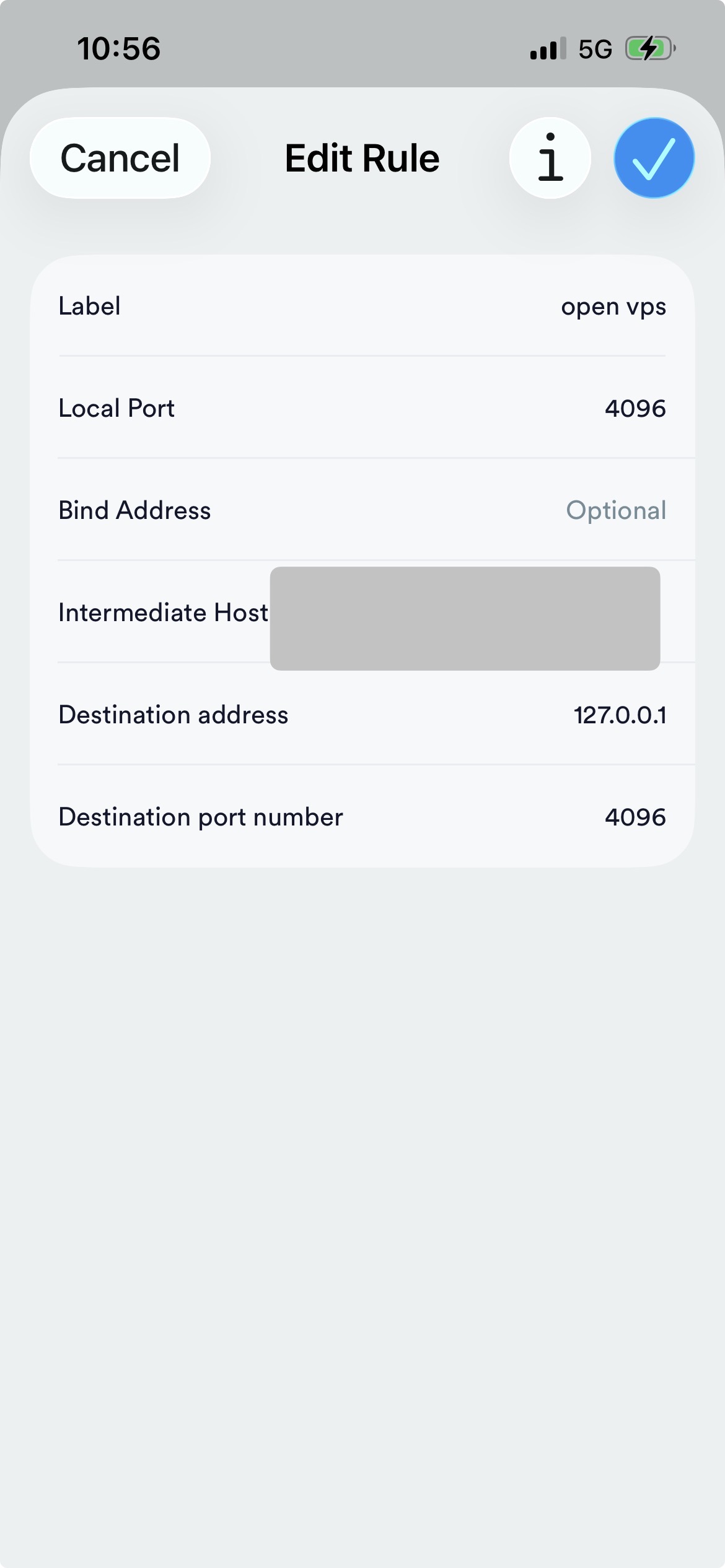
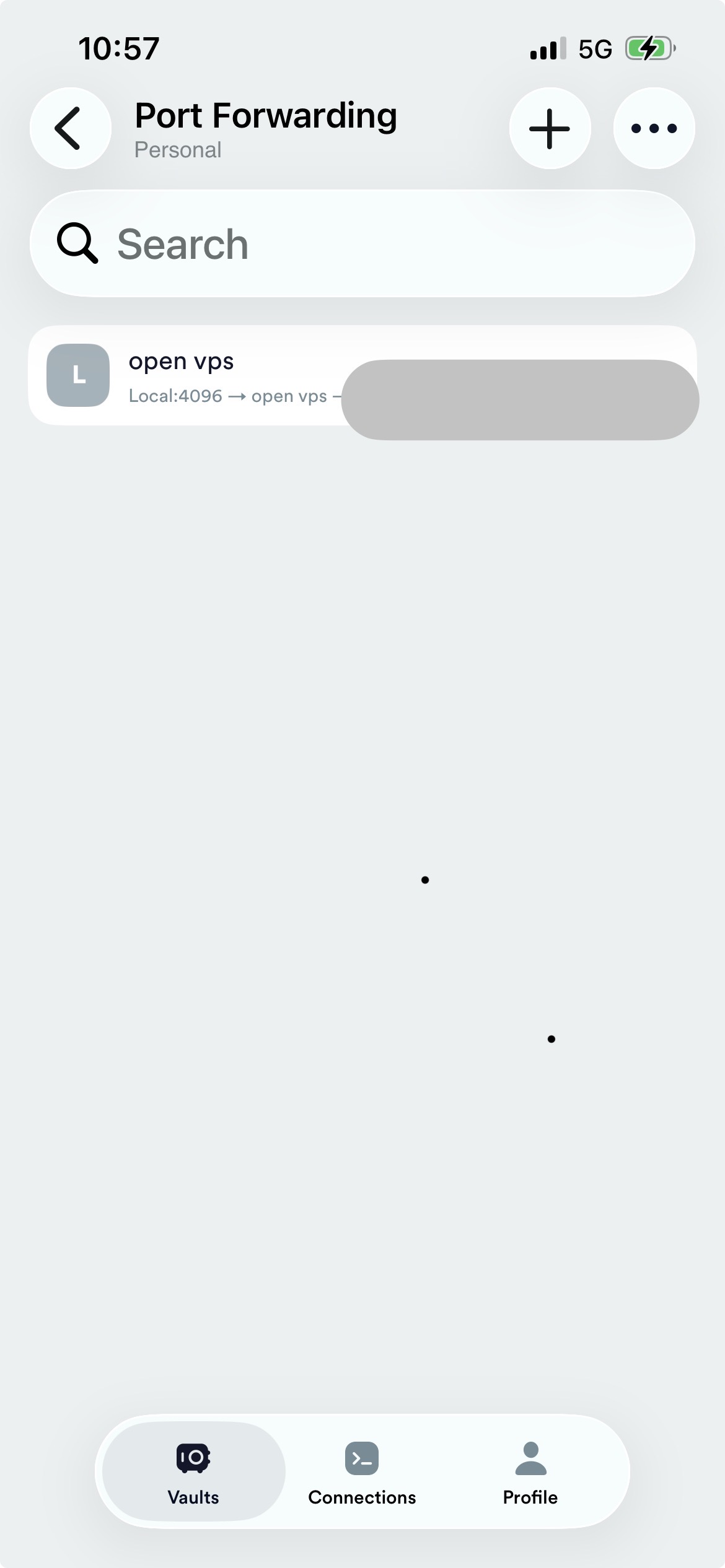
Le tunnel n'est pas limité au Mac : tout client SSH mobile supportant le « local port forwarding » fonctionne, par exemple Termius. Dans Termius : Vaults → Port Forwarding → +, avec Local Port / Destination port = 4096 et Destination address = 127.0.0.1.The tunnel isn't limited to a Mac: any mobile SSH client supporting local port forwarding works, e.g. Termius. In Termius: Vaults → Port Forwarding → +, with Local Port / Destination port = 4096 and Destination address = 127.0.0.1.
Déconnexions fréquentes sur iPhoneFrequent drops on iPhone
Mise en veille de l'app, bascule Wi-Fi/5G ou passage en arrière-plan coupent la règle. Il faut la relancer manuellement : c'est un dépannage ponctuel, pas un accès « toujours connecté » fiable.App sleep, a Wi-Fi/5G switch or backgrounding cut the rule. You must restart it manually: it's an occasional workaround, not a reliable always-on access.
Synchroniser du code (GitHub)Sync your code (GitHub)
Génère une clé SSH dédiée à un repo sur le VPS et affiche la clé publique à ajouter en Deploy Key sur ce repo précis.Generate an SSH key dedicated to one repo on the VPS and print the public key to add as a Deploy Key on that specific repo.
$ make github-deploy-key REPO=mon-repomy-repoGitHub interdit qu'une même clé serve sur plusieurs repos (key already in use) — c'est volontaire, ça limite le rayon d'action de chaque clé. Pour un autre repo, relance avec un REPO= différent. Le VPS n'a alors accès qu'aux repos où une clé a été explicitement ajoutée, jamais à tout un compte. La clé d'hôte de GitHub est vérifiée face à l'empreinte publiée par GitHub avant d'entrer dans le known_hosts du VPS — pas de confiance aveugle au premier contact.GitHub forbids reusing one key across repos (key already in use) — intentional, it limits each key's blast radius. For another repo, re-run with a different REPO=. The VPS then only has access to the repos where a key was explicitly added, never to a whole account. GitHub's host key is checked against the fingerprint GitHub publishes before it lands in the VPS's known_hosts — never trusted on first sight.
Sécurité — modèle de menaceSecurity — threat model
Les risques envisagés et le choix fait pour chacun.The risks considered and the choice made for each.
| RisqueRisk | MitigationMitigation |
|---|---|
| réseaunetwork Scan / brute-force depuis internetInternet scan / brute-force | Aucun port applicatif public — uniquement SSH (clé, pas de mot de passe) ; fail2ban bannit les IP qui matraquent le port SSH.No public app port — only SSH (key, no password); fail2ban bans IPs that hammer the SSH port. |
| SSH Vol de la clé privée SSHSSH private key theft | harden force la clé uniquement, puis vérifie que sshd l'applique vraiment (il échoue si l'image cloud la réactive) ; mets une passphrase sur ta clé.harden enforces key-only, then verifies that sshd really applies it (it fails if the cloud image re-enables it); put a passphrase on your key. |
| tiersthird party Accès à l'UI opencode par un tiers ayant un accès SSHA third party with SSH access reaching the opencode UI | Mot de passe applicatif dédié, indépendant du tunnel.Dedicated app password, independent of the tunnel. |
| GitHub Serveur compromis → accès au compte GitHubCompromised server → GitHub account access | Deploy keys par repo, jamais un token donnant accès à tout le compte.Deploy keys per repo, never a token granting whole-account access. |
| systèmesystem Paquets système vulnérablesVulnerable system packages | Mises à jour de sécurité automatiques ; reboot programmé au choix.Automatic security updates; scheduled reboot optional. |
| logs Des logs qui deviennent une seconde copie de tes secretsLogs quietly becoming a second copy of your secrets | Niveau WARN par défaut : en INFO, opencode enregistre le texte de chaque commande shell lancée par un agent, identifiants compris. Le fichier de log d'opencode passe en 600 dans un répertoire 700 et est tourné par logrotate.Default level WARN: at INFO, opencode records the text of every shell command an agent runs, credentials included. opencode's log file is set to 600 in a 700 directory and rotated by logrotate. |
| par conceptionby design Accéder à opencode = root sur le VPSReaching opencode = root on the VPS | Assumé, non mitigé. opencode tourne en VPS_USER, qui a le sudo sans mot de passe sur les images cloud Ubuntu, et il exécute des commandes shell arbitraires — c'est la nature du produit. Quiconque franchit le mot de passe applicatif, tout process local sur le VPS, ou une prompt injection venue d'un repo cloné, obtient de fait un root.Accepted, not mitigated. opencode runs as VPS_USER, which has passwordless sudo on Ubuntu cloud images, and it executes arbitrary shell commands — that is what the product is. Anyone past the app password, any local process on the VPS, or a prompt injection from a cloned repo, effectively has root. |
Vérifie tout ça d'un coup avec make test : sortie OK / FAIL ligne par ligne, code de sortie non-nul si un problème est détecté.Check it all at once with make test: line-by-line OK / FAIL output, non-zero exit code if a problem is found.
FAQ / DépannageTroubleshooting
Combien ça coûte ? (exemple)How much does it cost? (example)
Ce projet ne couvre que la partie VPS — le prix du modèle IA relève d'opencode et de ton fournisseur d'API, pas de ce setup, et tu peux brancher opencode sur l'offre de ton choix. À titre indicatif seulement, la configuration personnelle de l'auteur : VPS Gandi ~8 €/mois (1 vCPU / 2 Go de RAM) et un abonnement « opencode Go » à ~5 €/mois avec le modèle GLM 5.2. Ce sont des choix personnels donnés en exemple, pas un minimum requis.This project only covers the VPS side — the AI model's price is opencode's and your API provider's domain, not this setup, and you can point opencode at whatever plan you like. As a rough example only, the author's personal setup: a Gandi VPS at ~€8/mo (1 vCPU / 2 GB RAM) and an "opencode Go" subscription at ~€5/mo with the GLM 5.2 model. These are personal choices given as an example, not a required minimum.
make all a l'air bloqué sur security-updatesmake all looks stuck on security-updates
Ce n'est presque jamais le cas. Une image cloud a souvent plusieurs mois, donc le premier passage d'unattended-upgrade a 150+ mises à jour de sécurité à installer, paquet par paquet, sur 1 vCPU. Compte 10 à 15 minutes rien que pour cette étape : d'abord quelques minutes silencieuses (résolution des dépendances à 100 % de CPU, sans rien afficher), puis un long défilement de sortie apt. Une ligne ... still working (MM:SS elapsed) toutes les 30 s montre que l'étape est bien vivante entre-temps. Des messages comme tar: Exiting with failure status, conffile prompt ou Could not figure out development release sont normaux : unattended-upgrade saute les paquets qui demanderaient une réponse interactive. Ce qui compte, c'est le make test final.It almost never is. A cloud image is often months old, so the first unattended-upgrade pass has 150+ security updates to install, one package at a time, on 1 vCPU. Count 10 to 15 minutes for that step alone: a few silent minutes first (dependency resolution at 100% CPU, printing nothing), then a long scroll of apt output. A ... still working (MM:SS elapsed) line every 30s shows the step is alive meanwhile. Messages like tar: Exiting with failure status, conffile prompt or Could not figure out development release are normal: unattended-upgrade skips the packages that would need an interactive answer. What matters is the final make test.
Rien là-dedans ne te pose jamais de question. Les dernières lignes affichées avant le silence sont en général Initial blacklist: et Initial whitelist (not strict): — deux lignes de log terminées par deux-points sans rien derrière, parce qu'aucun filtre de paquets n'est défini (cette paire vide est le défaut Ubuntu, et c'est le bon : un paquet en blacklist cesserait de recevoir les correctifs de sécurité). Ça ressemble à un prompt resté sans réponse, mais unattended-upgrade est non interactif par conception, et tout passe ici par un ssh <commande> sans terminal attaché — rien ne pourrait te demander quoi que ce soit. Ne tape rien, ne fais pas Ctrl+C : laisse tourner.Nothing in there is ever asking you a question. The last lines printed before the silence are usually Initial blacklist: and Initial whitelist (not strict): — two log lines ending in a colon with nothing after it, because no package filter is set (that empty pair is the Ubuntu default, and the right one: a blacklisted package would stop receiving security fixes). It looks like an unanswered prompt, but unattended-upgrade is non-interactive by design, and everything here runs over ssh <command> with no terminal attached — nothing could prompt you. Don't type anything and don't Ctrl+C: let it run.
$ ssh ubuntu@<ip> 'sudo tail -f /var/log/unattended-upgrades/unattended-upgrades-dpkg.log'Le tunnel se coupe, ou « connection refused » sur 127.0.0.1:4096The tunnel drops, or "connection refused" on 127.0.0.1:4096
make tunnel doit rester ouvert au premier plan pendant toute la session. S'il s'est fermé (Mac en veille, changement de réseau), relance make tunnel. Le tunnel envoie déjà des keepalives ; si ça coupe quand même, c'est presque toujours la veille de la machine ou une bascule réseau, pas le VPS.make tunnel must stay open in the foreground for the whole session. If it closed (Mac asleep, network change), re-run make tunnel. The tunnel already sends keepalives; if it still drops, it's almost always machine sleep or a network switch, not the VPS.
« Address already in use » au lancement de make tunnel"Address already in use" when starting make tunnel
Le port local 4096 est déjà pris (souvent un ancien tunnel resté ouvert, ou un tunnel vers un autre VPS). Trouve le process avec lsof -iTCP:4096 -sTCP:LISTEN puis ferme-le, ou utilise simplement un autre port local — LOCAL_PORT ne change que ton côté du forward, le VPS continue d'écouter sur OC_PORT :Local port 4096 is already taken (often an old tunnel left open, or a tunnel to another VPS). Find the process with lsof -iTCP:4096 -sTCP:LISTEN and close it, or just use another local port — LOCAL_PORT only changes your end of the forward, the VPS keeps listening on OC_PORT:
$ make tunnel LOCAL_PORT=5000 # puis http://127.0.0.1:5000# then http://127.0.0.1:5000L'interface opencode affiche les projets d'un autre VPSThe opencode UI shows projects from another VPS
Ils ne sont pas sur ce VPS — rien n'est copié d'un serveur à l'autre. Cette liste vient de la mémoire de ton navigateur : l'interface web d'opencode range son état (projets récents, thème, langue) dans le localStorage, que le navigateur rattache à l'origine — et http://127.0.0.1:4096 est la même origine pour tous les VPS vers lesquels tu ouvres un tunnel. Un second VPS joint sur le même port local hérite donc de la liste du premier. Cmd+Shift+R n'y change rien : un rechargement forcé vide le cache HTTP, jamais le localStorage.They are not on this VPS — nothing is copied between servers. That list is your browser's memory: the opencode web UI keeps its state (recent projects, theme, language) in localStorage, which the browser scopes to the origin — and http://127.0.0.1:4096 is the same origin for every VPS you tunnel to. A second VPS reached on the same local port inherits the first one's list. Cmd+Shift+R does not help: a hard reload clears the HTTP cache, never localStorage.
Pour nettoyer, dans la console DevTools de la page : localStorage.clear(); location.reload(). Pour que ça ne se reproduise pas, donne à chaque VPS son propre port local — un port différent, c'est une origine différente, donc un état séparé :To clear it, in the page's DevTools console: localStorage.clear(); location.reload(). To avoid it, give each VPS its own local port — a different port is a different origin, so each keeps its own state:
$ make tunnel                    # VPS A sur http://127.0.0.1:4096# VPS A on http://127.0.0.1:4096
$ make tunnel LOCAL_PORT=4097    # VPS B sur http://127.0.0.1:4097# VPS B on http://127.0.0.1:4097
J'ai perdu (ou je veux changer) le mot de passe opencode-webI lost (or want to change) the opencode-web password
Perdu ? Il n'est pas perdu. Rien n'est stocké de ton côté, mais le VPS l'a toujours : le service le lit dans /etc/opencode-web.env à chaque démarrage. Pour le réafficher — cette commande ne fait que lire, ta session ouverte continue de fonctionner :Lost it? It isn't gone. Nothing is stored on your side, but the VPS still has it: the service reads it from /etc/opencode-web.env at every start. To print it back — this only reads, so your open session keeps working:
$ make passwordTu veux le changer ? C'est une autre opération : elle invalide l'ancien mot de passe, donc toute session ouverte devra se reconnecter.Want to change it? That is a different operation: it invalidates the old password, so any open session has to log in again.
$ make opencode-web-service ROTATE_PASSWORD=yes
==> App password
    New password generated -- any open browser session has to log in again.
Sans ROTATE_PASSWORD=yes, redéployer le service conserve le mot de passe existant : tu peux rejouer la cible pour un changement de config (niveau de log, port) sans déconnecter ta session navigateur. Dans tous les cas, l'identifiant à saisir est opencode.Without ROTATE_PASSWORD=yes, redeploying the service keeps the existing password: you can re-run the target for a config change (log level, port) without logging out your browser session. Either way, the username to enter is opencode.
opencode a sorti une nouvelle version — comment mettre à jour ?opencode released a new version — how do I update?
make opencode-update met à jour le binaire et redémarre opencode-web, et c'est justement la partie facile à rater à la main : un processus déjà lancé garde l'exécutable avec lequel il a démarré, donc remplacer le fichier laisse systemd servir l'ancienne version jusqu'au redémarrage de l'unit. Réinstaller avec make opencode-install a exactement ce trou. Relancer la cible alors que tu es déjà à jour ne coûte rien : la version est comparée avant/après et le service est laissé tranquille si elle n'a pas bougé.make opencode-update updates the binary and restarts opencode-web, which is precisely the part that's easy to get wrong by hand: a running process keeps the executable it started with, so replacing the file leaves systemd serving the old version until the unit restarts. Reinstalling with make opencode-install has exactly that gap. Re-running the target when you're already up to date is free: the version is compared before and after, and the service is left alone if it didn't move.
$ make opencode-update                    # dernière version publiée# latest published version
$ make opencode-update OC_VERSION=1.18.4   # figer une version, ou revenir en arrière# pin a version, or roll back
Quand il y a bien mise à jour, le redémarrage coupe ce que l'agent faisait à cet instant ; rien d'autre n'est touché — mot de passe, projets, sessions et config restent en place.When it does update, the restart cuts whatever the agent was doing at that moment; nothing else is touched — password, projects, sessions and config all stay.
Où sont les logs d'opencode ?Where are opencode's logs?
Dans journald, et dans un fichier. Le service tourne avec opencode web --print-logs, ce qui envoie le log applicatif sur stderr, où systemd le récupère. Sans cette option, il n'atterrit que dans ~/.local/share/opencode/log/opencode.log : journalctl n'affiche alors que la bannière de démarrage, et une vraie erreur d'exécution reste invisible au moment où tu la cherches.In journald, and in a file. The service runs opencode web --print-logs, which sends the application log to stderr, where systemd picks it up. Without that flag it lands only in ~/.local/share/opencode/log/opencode.log: journalctl then shows the startup banner and nothing else, and a real runtime error stays invisible exactly when you go looking for it.
$ make logs
$ make logs SINCE=-2h   # toute expression journalctl --since# any journalctl --since expression
--print-logs duplique, il ne redirige pas : le fichier continue d'être écrit. Comme opencode ne le fait jamais tourner, l'installation ajoute /etc/logrotate.d/opencode (quotidien, 7 jours, rotation forcée au-delà de 10 Mo) et met le fichier en 600 dans un répertoire 700.--print-logs duplicates, it does not redirect: the file keeps being written. Since opencode never rotates it, the install adds /etc/logrotate.d/opencode (daily, 7 days, forced rotation past 10 MB) and sets the file to 600 in a 700 directory.
La verbosité se règle avec OC_LOG_LEVEL, WARN par défaut. C'est un choix de confidentialité : en INFO, opencode journalise une ligne par commande shell lancée par un agent, texto — donc tout identifiant que tes projets manipulent en ligne de commande est recopié dans le journal et dans le fichier. WARN conserve tous les avertissements et erreurs.Verbosity is OC_LOG_LEVEL, WARN by default. That's a privacy choice: at INFO, opencode logs one line per shell command an agent runs, verbatim — so any credential your projects handle on a command line is copied into both the journal and the file. WARN still carries every warning and error.
Le service opencode-web ne démarre pasThe opencode-web service won't start
Regarde la cause : ssh ubuntu@<ip> 'systemctl status opencode-web.service; journalctl -u opencode-web.service -n 50 --no-pager'. Causes fréquentes : opencode-install pas passé (binaire absent), dossier /home/ubuntu/projects inexistant, ou /etc/opencode-web.env manquant. Après correction : make restart puis make test. S'il démarre mais se comporte mal, make logs montre ce qu'opencode a à dire.Check the cause: ssh ubuntu@<ip> 'systemctl status opencode-web.service; journalctl -u opencode-web.service -n 50 --no-pager'. Common causes: opencode-install not run (missing binary), /home/ubuntu/projects folder absent, or /etc/opencode-web.env missing. After fixing: make restart then make test. If it starts but misbehaves, make logs shows what opencode itself has to say.
SSH : « Permission denied (publickey) »SSH: "Permission denied (publickey)"
harden désactive l'auth par mot de passe : seule ta clé est acceptée ensuite. Assure-toi que ta clé publique est bien dans ~/.ssh/authorized_keys sur le VPS avant de lancer harden, sinon tu risques de te verrouiller dehors (récupération via la console de secours KVM/VNC de l'hébergeur).harden disables password auth: only your key is accepted afterward. Make sure your public key is in ~/.ssh/authorized_keys on the VPS before running harden, or you risk locking yourself out (recover via the provider's KVM/VNC rescue console).